A pet is rarely one person's job.
Partners, kids, parents, sitters, dog walkers. CorePaw puts them all on the same record — and lets you decide exactly what each of them can change.
- Invite with a code that already carries their access
- Viewer, Member and Co-owner roles
- Tick the areas a Member can change
- Presets — Full carer, Helper, View only
- A label like "Child" or "Dog walker"
- Or scope someone to only some of your pets
- Adjust or remove access any time
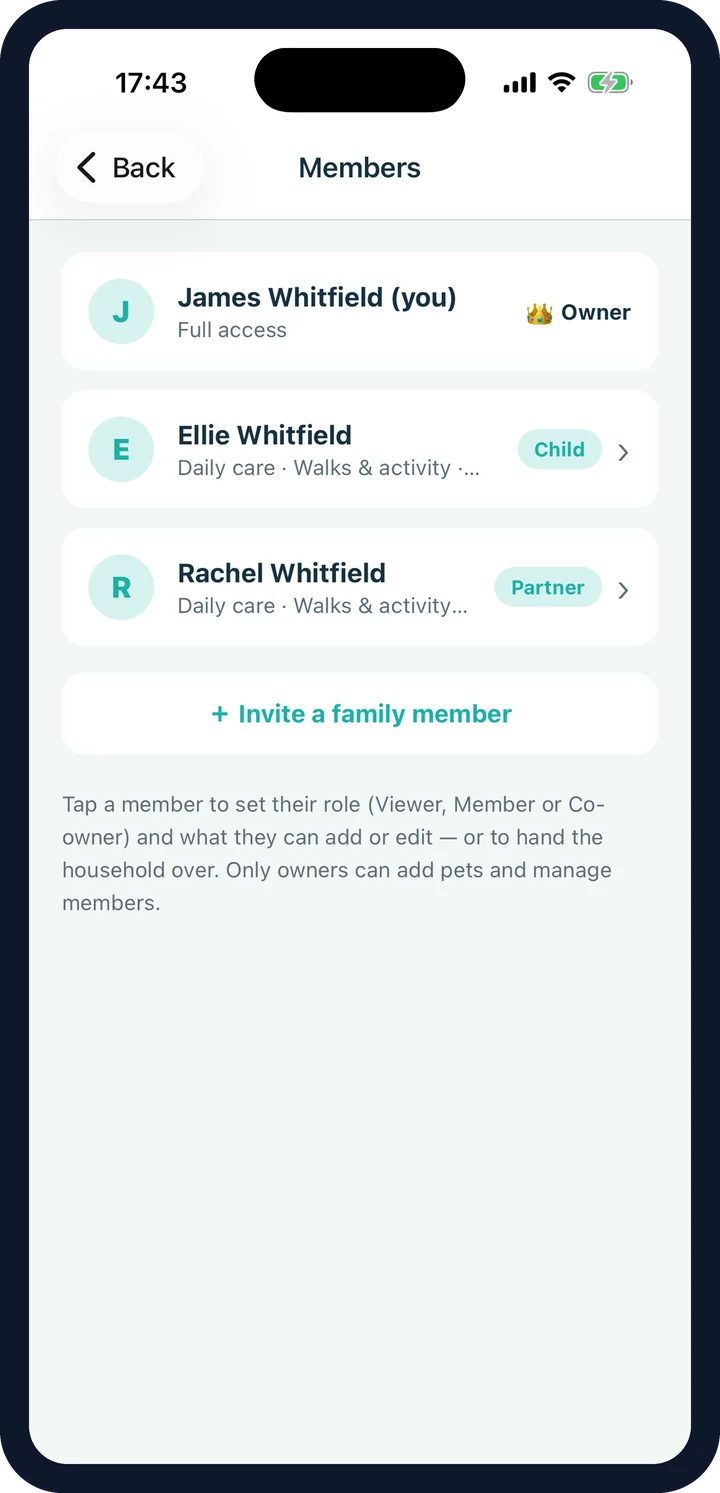
Two separate questions: who sees, and who can change.
Which of your pets a person can see at all, and what they are allowed to change. Most households only ever answer the second one — everybody sees every animal, because a sitter should be able to read the allergies — but the first is there when a household needs it.
Viewer
Sees everything, changes nothing.
Grandparents, an occasional sitter, anyone who just needs to know.
Member
Can change the areas you tick.
Daily care, walks, medications, health records, measurements, symptom diary — your choice, per person.
Co-owner
Full access, like the owner.
A partner who should be able to add pets, customise sections and manage the household too.
How pet-sharing permissions are enforced.
Plenty of apps "restrict" access by hiding a button. CorePaw enforces every permission with row-level security on the server, so a member without medication access simply cannot write medication data — whatever their phone tries to do.
- Row-level security on every table, per household
- Access chosen when you send the invite
- Editable any time from Explore → Members
- Promote a Co-owner, or hand over ownership entirely
- A household always keeps at least one owner
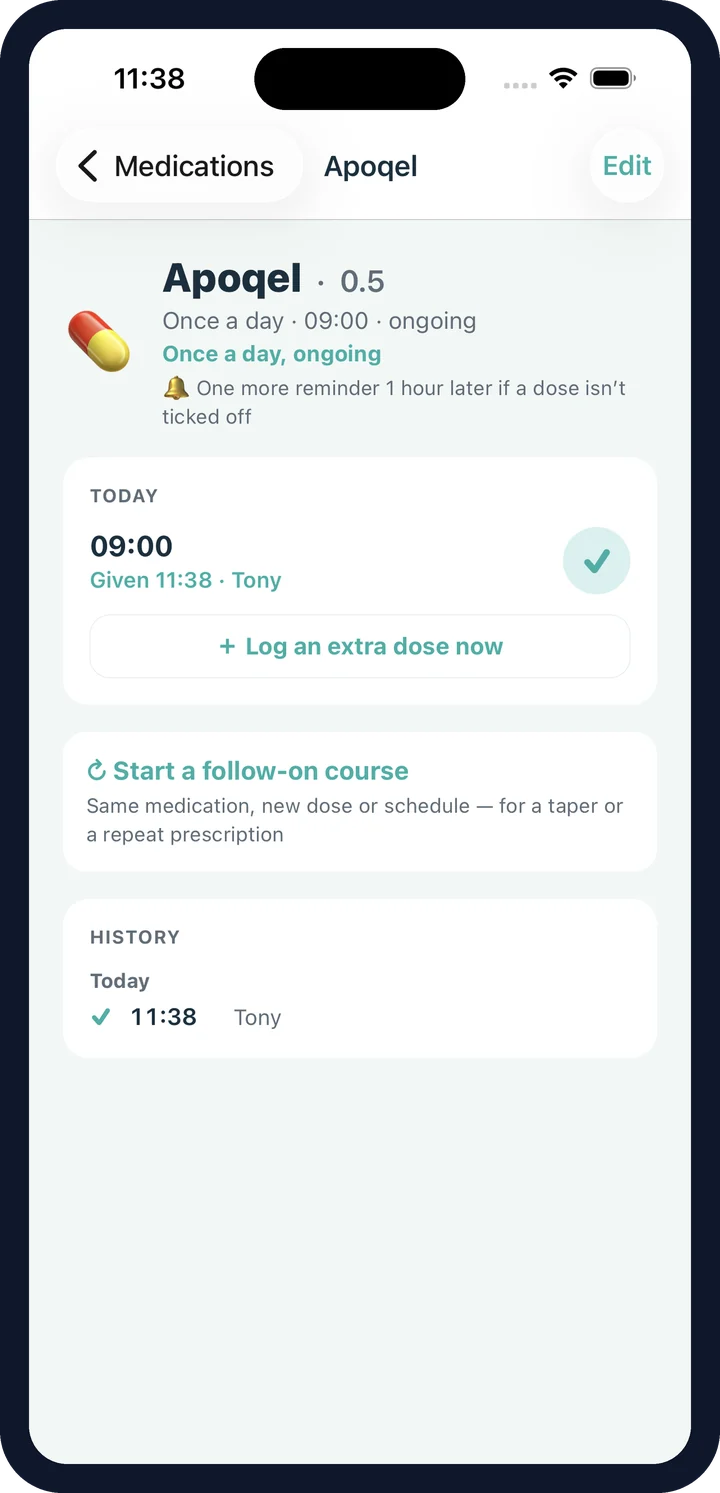
Who logged what, and when.
No double-feeding
Every entry says who logged it and when, on everyone's phone.
No double-dosing
A shared dose checklist, plus a live "Tony gave the 08:00 dose" alert.
Walks you didn't do
The dog walker's walk lands in your pet's history automatically.
Nothing lost with a phone
Premium syncs and backs up, so a new handset picks up where the old one left off.
Family sharing is part of Premium. See what's free and what isn't →
Family sharing FAQ
How do I add someone to my pet's record?
You share an invite code. The code carries the access you picked when you created it — the role, the name you gave them and the permissions — so the person lands with exactly the right access rather than you fixing it afterwards. They do not need a CorePaw account to join: they enter the code and they are in. The app then offers them an email and password so they can sign back in on another phone, which they can skip.
What are the roles?
Viewer sees everything and changes nothing. Member can add and edit the areas you tick — daily care, walks, medications, health records, measurements, symptom diary — with quick presets for Full carer, Helper and View only. Co-owner has full access, like the owner.
Can I stop someone seeing my insurance policy?
Documents and the photo gallery are behind their own permissions, so you can give a dog walker walk access without giving them your paperwork. Everyone can see the core pet details — the ticks decide who can change things and who can open the gated sections.
Are permissions actually enforced?
Yes — in the database, with row-level security, not just by hiding buttons in the app. A member without medication access cannot write medication data even if something else on their phone tried to.
Can I give someone a label?
Yes. A member picks or is given a label like "Child" or "Dog walker", so the log reads sensibly and you can see at a glance who is who.
Can someone see one pet but not another?
Yes, in a household with more than one animal. The default is every pet, so an ordinary household never meets the choice — but you can scope a member to some of them: the cat with one child, the dog with another, and the dog added to the first when they are old enough. A pet taken away disappears from that person's list, gallery, history and search, including anything already downloaded to their phone, which is tidied up the next time it connects. Co-owners are never scoped.
What if I want someone else to run the household?
An owner can promote a Co-owner — a second person with full rights — or transfer ownership entirely and step down to a fully-capable member. A household always keeps at least one owner.
Is family sharing free?
No. Sharing with other people is part of Premium ("CorePaw Cloud"), along with sync, cloud backup and cloud media. The whole app is free on one device for one pet.
What happens to my data if I stop paying?
Your pets' records are on your phone — that is where CorePaw writes them first — so they stay with you. Premium adds cloud sync, backup and sharing on top.
Get everyone on the same page.
CorePaw is out now on the App Store and Google Play, and free for your first pet — no card, no trial clock.