The walk they did, in your pet's own record.
When the person who walks your dog runs their round on CorePaw Pro, their walk lands in your app like any other — route map, what happened, who logged it — and you decide, per pet, exactly what they can see.
- Choose what they see, dog by dog
- Their walks join your pet's own history
- Live alerts at pickup and at drop-off
- Ask for a walk, and see what they said
- Message them where the dog lives
- Free for owners — the walker is the customer
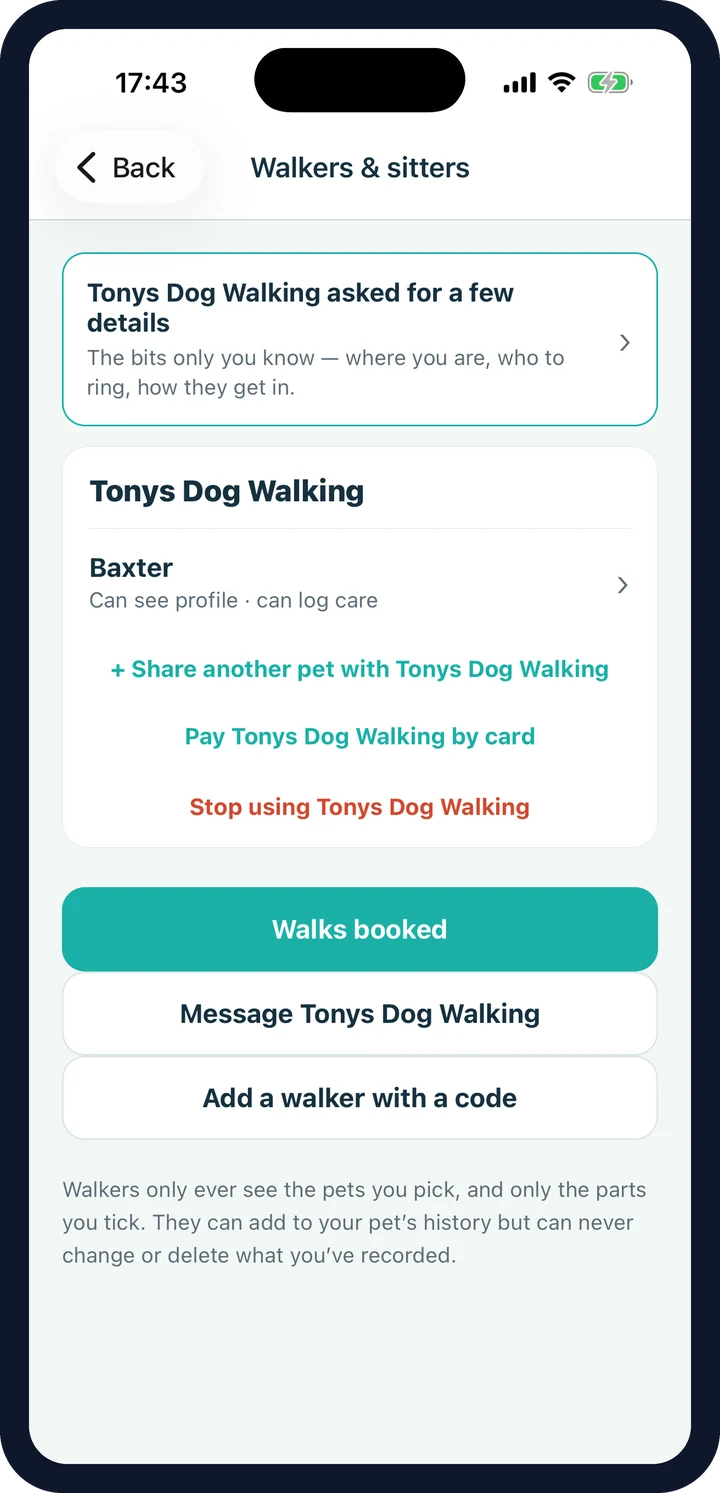
Two things have to be true.
You use a walker or sitter, and they run their business on CorePaw Pro — the separate app for walkers, sitters and carers. Everything on this page follows from those two facts and appears nowhere without them: an owner who walks their own dog never sees a walker tab, an empty list or a prompt to hire one.
If your walker keeps a paper diary and a WhatsApp group, none of this reaches you. If they might want the tools, send them to corepawpro.co.uk — it is their side of this, not yours.
What is not conditional: the price. The owner side is free, permanently, and is not part of Premium. Your walker pays for the tools that run their business; you never pay to receive what they send you.
Your walker's walks in your pet's history.
A walk recorded by your walker is not a message you have to file — it is already in the same history as the walks you did yourself, the jabs, the weights and the medications.
The walk itself
Route map, distance and duration, plus the diary of what actually happened — wee, poo, play, a treat, a photo — and "Logged by" the person who did it.
Pickup and drop-off
Your phone buzzes when the dog is collected and again when they are home. Sent as it happens, never queued to the end of the round.
Ask for a walk
Request a date and time from your walker's price list with a note, and see what they said: accepted, declined, or a different time to accept in one tap.
A thread per walker
A conversation in the app the dog lives in, with photos. Business-wide notices — "snow overnight, no walks tomorrow" — arrive in the same place.
Per-pet permissions
Tick what they may see for each dog: profile, feeding, medications, health, symptoms, measurements, documents, photos — and whether they may log care or doses.
Yours to revoke
Stop sharing whenever you like. You keep every walk they recorded; they lose access from that moment. They could never edit your records anyway.
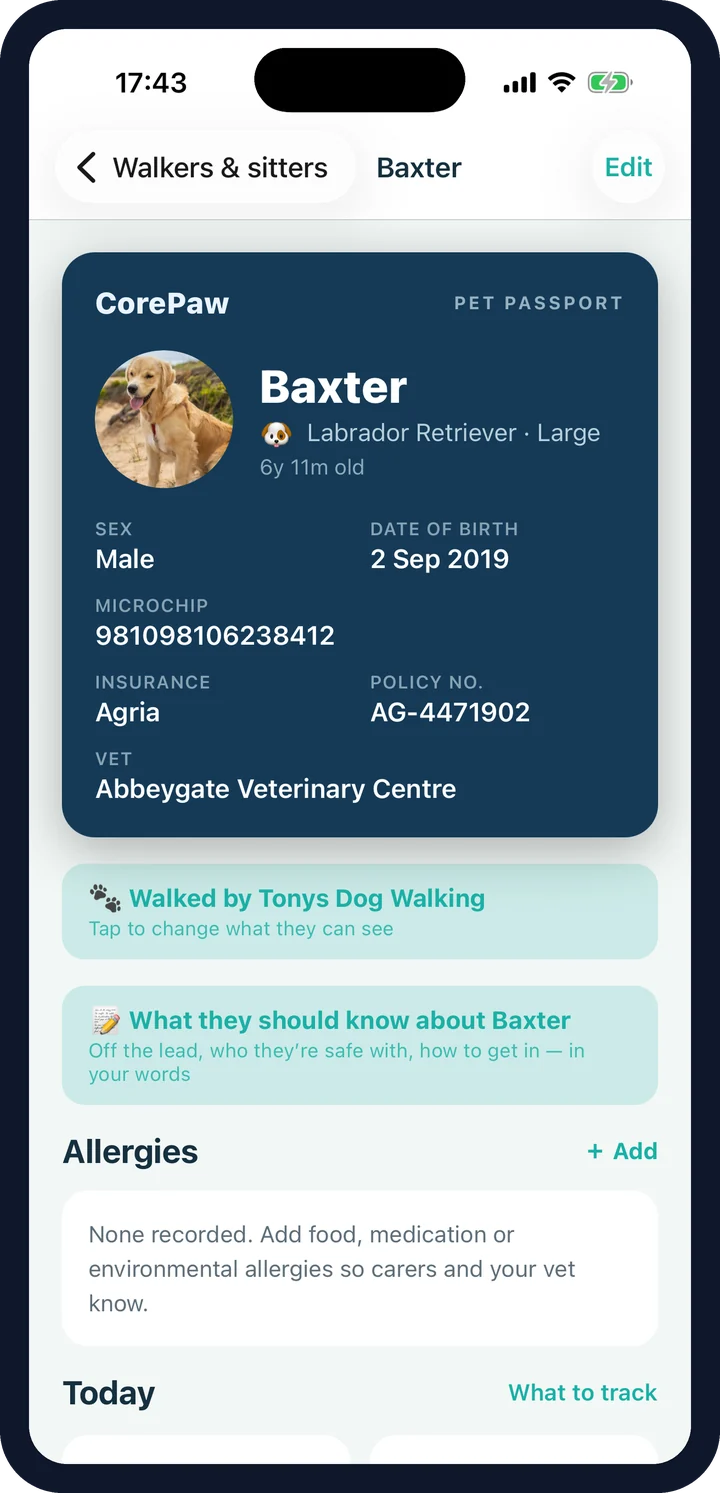
Care instructions written on the dog, not sent to one person.
Off the lead or not, how the recall is, who they must not be walked with — and for a cat, indoor or outdoor, the litter, and where they hide. You write it once on the pet, because it is a fact about your animal rather than a message to one walker. A relative popping in to feed them can read it too.
Where a walker has written down their own recollection of what you told them, your answer is the one that counts: yours is shown first, and theirs only appears underneath when the two disagree.
Walker sharing and household sharing are not the same.
A family member joins your household: they get a role, they can be given the run of the place, and the pets are shared by default. A walker is a business you have hired. They are never in your household, they see only the pets you tick and only the parts you tick, they can add to a pet's history but never change what you recorded, and you can end it in one tap.
If your walker has sent you a connect code or a link, that is what it does — it asks you which pets to share and what the walker may see, before anything is shared at all.
Dog walker sharing FAQ
Do I need a dog walker to use CorePaw?
No. CorePaw is a pet record first — passport, health, medications, walks, weight — and none of the walker features exist for you unless you actually share a pet with a walking or sitting business. There is no empty "walkers" tab sitting there reminding you that you do not have one.
Does my walker have to use CorePaw?
Yes — specifically CorePaw Pro, the separate app for walkers, sitters and carers. If your walker uses a diary and a WhatsApp group, none of this applies to them or to you. Walkers can find CorePaw Pro at corepawpro.co.uk.
Does it cost me anything?
No. The owner side is free and stays free, including the walk reports, the alerts, the booking requests and the messages. It is not part of CorePaw Premium and it is not something you can be locked out of. The walker pays for their business tools; you never pay to receive what your walker sends you.
What can my walker actually see?
Exactly what you tick, per dog: profile, feeding, medications, health records, symptoms, measurements, documents and photos — and separately, whether they may log care or mark medication doses. A pet you have not shared stays private, even from a walker who walks your other one.
If I use the same walker for a second dog, do they get access automatically?
No. Adding a second pet to a walker you already use asks the permission questions again for that animal rather than inheriting them. Sharing one dog never quietly becomes sharing the household.
Can I stop sharing?
Any time, from Explore → Walkers & sitters. You keep every walk they recorded — the history is yours — but they lose access from that moment.
Can my walker change what I have recorded?
No. A walker can add to your pet's history — a walk, a diary entry, a photo — and can log care where you have allowed it. They can never edit or delete anything you recorded.
What are the care notes for?
Off the lead or not, recall, who they must not be walked with; for a cat, indoor or outdoor, the litter, where they hide. You write them once on the pet, so they are a fact about your animal rather than a message to one particular walker — anyone the pet is shared with can read them, including a relative popping in.
Are the pickup and drop-off alerts live?
Yes, sent as they happen rather than batched at the end of the day. A reassurance that arrives an hour late is not a reassurance.
Free for you, whether or not you use a walker.
CorePaw is out now on the App Store and Google Play, and free for your first pet — no card, no trial clock. The walker features cost owners nothing and appear only if you actually use a walker who runs on CorePaw Pro.